Drop in a screenplay and NUVAR lays out a board of shots — acts, scenes, a card each with a camera type and a duration. Then generate the frame instead of drawing it, with your own key. €49 once — no subscription. Public beta: fully usable, still in active testing.
It will not make your film. It gets you to a board you can put in front of people.
14-day full trial · no credit card · 30 days money-back · your projects stay in your folders
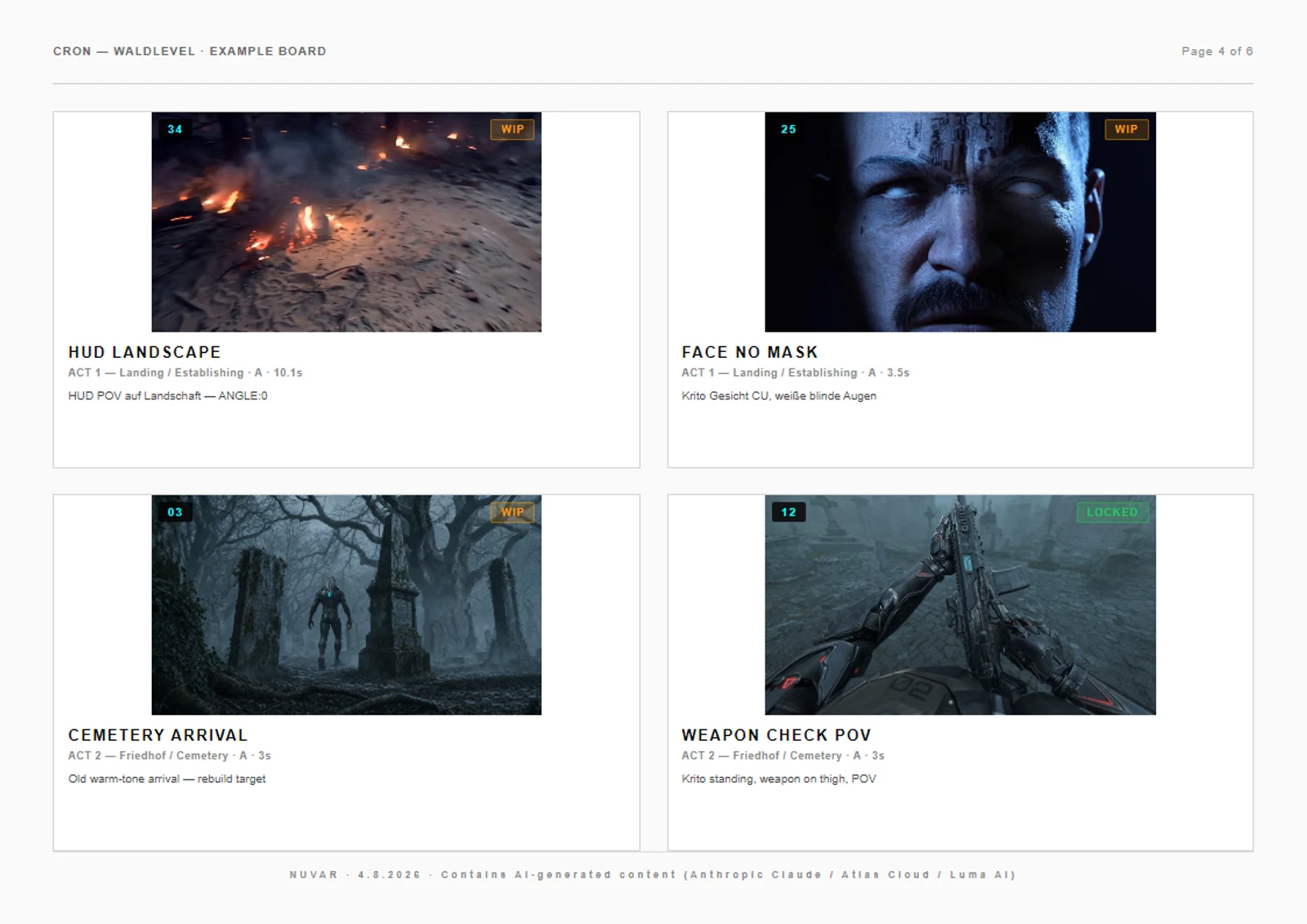
A sheet from CRON — WALDLEVEL, a project that is actually being made. Every frame on it was generated in NUVAR, shot by shot. Nothing was drawn, and nothing was tidied up for this page — the shorthand in the descriptions is the director's own, in his own language.
Page 4 of 6 · A4 landscape · 4 shots per page
The whole way through, start to finish, in one sitting.
A storyboard is a lot of small decisions laid next to each other. NUVAR gets you to the point where you can see them all — without a pencil, a stock-photo hunt or five open tabs.
NUVAR reads your screenplay and breaks it into acts, scenes and shots — with suggested camera angles and durations. Even feature-length scripts, auto-split into parts.
Generate the image for a shot instead of drawing it — 25 models, your own key. Your character and location references ride along on every shot. Block the tricky ones in 3D first.
A print-ready PDF storyboard for the table, per-shot PNGs when someone needs the frames on their own, an animatic when the board has to move, and Premiere or After Effects sequences for the edit.
Paste or import your script and let NUVAR (powered by Claude or GPT, your key) propose the acts, scenes and individual shots — each with a camera type and a duration. You start with a full board, not a blank page.

One click per shot or batch the whole project — Seedream, FLUX, GPT-Image, Nano Banana and more, across three providers. Every model shows its price per image up front, so you pick with your eyes open. Your key, your invoice: we never sit between you and the provider.

Build the character once — name, look, a handful of reference images — and it sits in the library for the whole project. Tag it on a shot and those images are attached from then on, whether you generate that shot by hand or run the whole act in one go. No prompt box to paste into, nothing to remember at three in the morning.

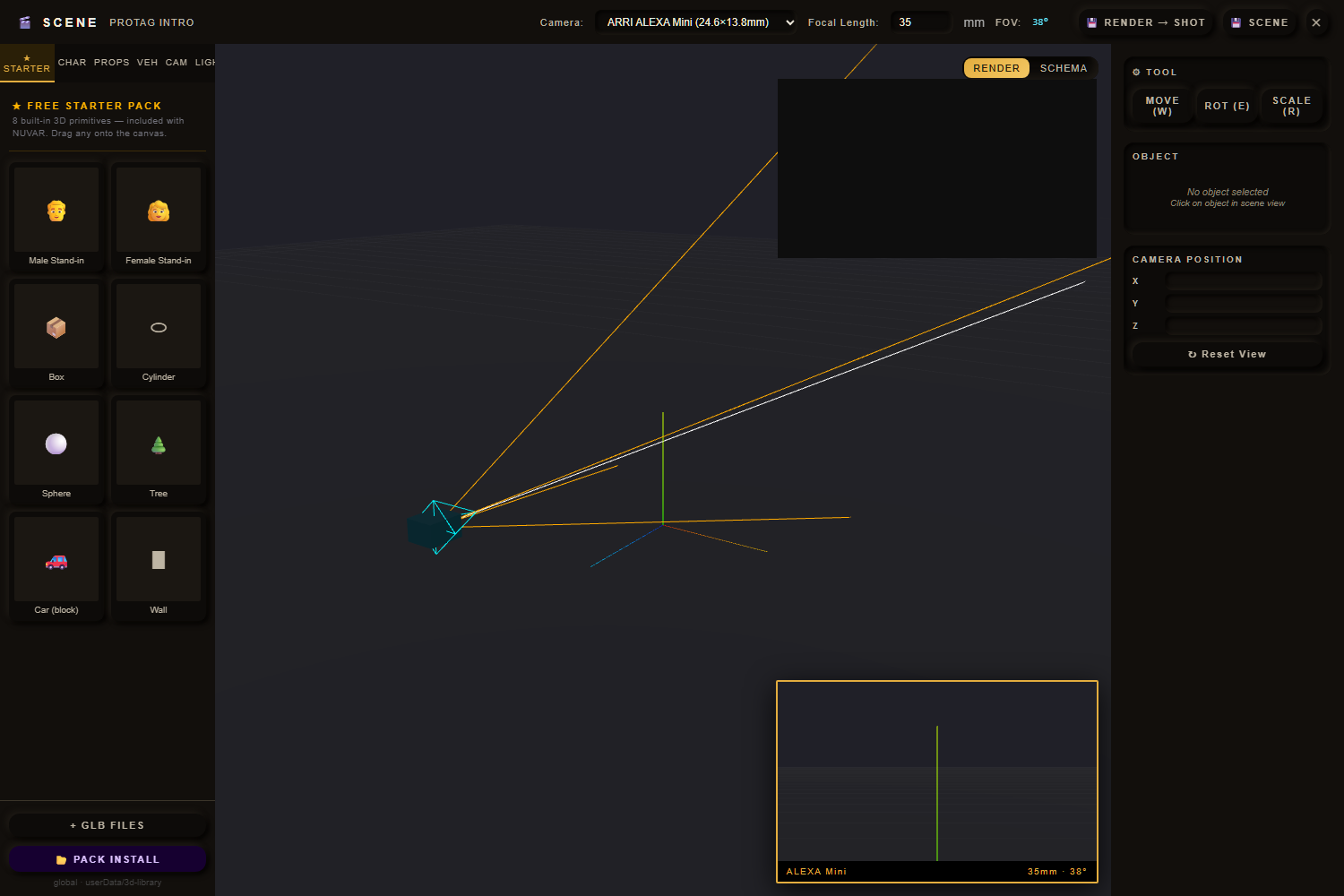
Block shots in a real-time 3D scene with a GLB starter pack and placeable lights, then hit play — your board runs in sequence at the right durations with per-shot audio mixed in.

FCP7 XML opens straight into Premiere & After Effects as a sequence. Add a WebM animatic (no extra tools), a print-ready PDF storyboard and per-shot PNGs.

They give you the grid, the numbering and the export. The picture is still your problem — draw it, shoot a stand-in, or go find it on another site. Here’s how that stacks up.
| Capability | NUVAR | SaaS storyboard apps | Manual (PS + sheets) |
|---|---|---|---|
| Script → automatic shot breakdown | ✓ AI | Partial | ✗ |
| AI image generation (25 models, 3 providers) | ✓ | 1 locked model | Separate site |
| Bring your own key · switch model any time | ✓ | ✗ | ✓ |
| References attached to every generation | ✓ | Rare | ✗ |
| 3D blocking / pre-viz | ✓ | ✗ | Separate app |
| Animatic playback with audio | ✓ | Some | ✗ |
| Premiere / After Effects export | ✓ FCP7 XML | Varies | By hand |
| Works with no account server | ✓ | ✗ cloud-only | ✓ |
| Projects are plain files you keep | ✓ | ✗ their servers | ✓ |
| Price | €49 once | monthly subscription | Tool sprawl |
No account, no login, no telemetry, and license checks run with the network off. The app asks nuvar.app once at start whether a newer version exists — that is the only thing it sends on its own. When you use an AI feature, your key talks to the provider directly; that request never passes through us.
€49 once. No subscription, no renewal. Free updates for the whole 1.x line, on all your personal machines.
Use your own keys: Anthropic or OpenAI for the script breakdown, Atlas Cloud, fal or Freepik for images and video. You pay the provider directly, at their price — nothing is marked up or routed through us. When a better model appears, you switch to it here instead of waiting for us to bless it.
Define a character or a location once and tag it. Every generation carries those images — including batches. What the model does with them is the model’s business; getting them there reliably is ours.
Premiere and After Effects open your boards as a sequence via FCP7 XML. WebM, PDF and per-shot PNG too.
Plain-JSON projects in folders you control. No lock-in — copy a project to another drive and it just works.
NUVAR grew a lot of controls. CREATE is a second face for the same projects and the same files: one ring for the steps, a wheel to pick the shot, three keys under your thumb. Nothing is hidden; the full board is one button away. It runs on my machine every day and it is in testing now. You are not buying a snapshot — it lands as a free update, at no extra cost, for the whole of version 1.
Turn a finished frame into a short clip when a still will not sell the shot. Built and in testing — it is not in the version you can download today.
Generate a room from several angles once, tag your shots with it, and that same space rides along as a reference — the fix for a set that quietly changes between shots.
Every generated clip is kept, not overwritten. Flip back to the take you liked, the way image versions already work.
Beta price. It goes up when the beta ends; a license bought now keeps working either way. One purchase, all of version 1.x included.
30 days to send it back, no questions asked. A 14-day full trial before that, no card.
vs. storyboard tools you rent by the month, per seat
All features unlocked, no credit card. After 14 days the app keeps working — only exports get a “TRIAL” watermark until you activate.
Storyboard software for Windows and macOS. You bring a screenplay; NUVAR reads it into a board — acts, scenes, one card per shot with a camera type and a duration — and then generates the frame for each shot through the model you choose, instead of you drawing it. Your character and location references ride along on every generation. When the board is done it goes out as a print-ready PDF, an animatic, per-shot images, or a Premiere / After Effects sequence. One app, on your own machine, with your own provider key.
Everything except the AI. Your projects, images and scripts are plain files on your disk; the board, the 3D view, the animatic and every export work with the network off, and license checks are offline (RSA-signed keys). The AI features are the exception, and we would rather say it plainly than have you find out: a script breakdown sends your text to Anthropic or OpenAI, whichever you picked. Image and video generation send your prompt and your reference images to the provider you picked. That traffic goes straight from your machine to them, with your key, and never passes through us. The only thing the app fetches from us is the version file it checks at start.
No. €49 once. Updates within your major version (1.x) are free for the life of the license. Your key works on multiple personal machines.
Yes — a 14-day full trial, every feature, no credit card. After the trial the app keeps running; only exports carry a “TRIAL” watermark until you activate.
Bring your own: Anthropic (Claude) or OpenAI (GPT) for the script breakdown, and Atlas Cloud, fal or Freepik for images and video — 25 image models and 15 video models between them. Keys are stored encrypted via your OS keychain and never sent to us. You pay the provider directly, at their price, with no markup from us.
FCP7 XML (Premiere & After Effects), WebM animatic (720p/1080p/1440p with audio), PDF storyboard (A4/Letter), per-shot PNG, and the project itself as JSON.
Windows 10/11 (64-bit) or macOS 11+ (Apple Silicon and Intel). 4 GB RAM minimum, 8 GB for 500+ shot projects, ~500 MB disk plus your project storage.